






















Welcome to Rahulda Customer Service
We’re always happy to hear from you! Whether you have questions about our products, customer service, website, or any other matter, we welcome your feedback and suggestions.
Your opinions are valuable to us and help us serve you better. Please feel free to contact us by phone or WhatsApp. We look forward to hearing from you!
Contact with an expert
Get in Touch
Contact us whenever you need.
10:30 AM to 11:55 AM/ 10:30 PM to 11:55 PM/ Customer Service Quick Help







Contact with an expert
Get in Touch
Working Time Table Notice
According to our work schedule, according to the schedule, from 10:30 am to 11:55 AM, and from 3:00 pm to 5:30 pm, And 10:30 to PM 11:55 PM
Chat right now
Our messaging assistant can quickly solve many issues or direct you to the right person or place.
Instant chat and always available.

According to your working hours Time Table, phone calls and WhatsApp make a video call and view and select your product.
Share some words you need and pictures of some products you need and wait and call us once when our working hours are open.
Contact with an expert
Get in Touch
✂️🧵🪡 Customization & Stitching Option
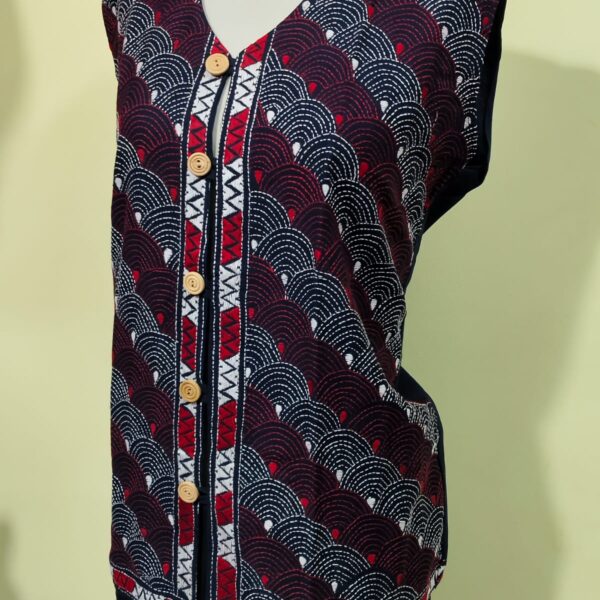
Choose your preferred kurti fabric, and we will stitch it especially for you in Size ( Example 44 )As each piece is custom-stitched, please allow a few extra days for preparation before delivery.
Tailoring service is available on request for an additional charge of only ৳180.
For superior durability, comfort, and a refined finish, the kurti will be stitched with a soft inner lining attached to the fabric.
✂️🧵🪡 Stitching Option
You can select the fabric of your choice.
It will be stitched to your specified size (e.g., Size 44).
Tailoring services are available for an additional charge of ৳180.
An inner lining will be provided, making the garment more durable and comfortable.
Easily restore color 🪥 🍋 🌰🫘
If, in the future, your brass, copper, or copper jewelry loses its luster, how should you clean it?
A simple method is to take a small amount of lemon or tamarind juice and gently rub it over the jewelry. Do not leave it on for more than 50 seconds. Afterward, rinse it with clean water and dry it off. This will restore the jewelry's shine.
Frequently asked questions
❓ How can I get my Shipping Tracking ID?
If you need your shipment tracking details, feel free to contact us.
📱 WhatsApp Support: +91 8327000096
After verifying your order, we will send your Shipping Tracking ID to the mobile number used for your order via WhatsApp. If your email address is available, we can also send the tracking details by email.
Thank you for shopping with Rahulda. 💚
❓ How to Place an Order on Rahulda.com?
Placing an order on Rahulda.com is simple and secure.
Follow these easy steps:
- Browse our products and select the item(s) you wish to purchase.
- Click Add to Cart.
- Review your cart and click Proceed to Checkout.
- Sign in to your Rahulda.com account.
- You can log in using your Email Address or Google Account (Gmail).
- If you're a new customer, simply create a new account during checkout.
- Enter your delivery address carefully.
- Choose your preferred payment method.
- Review your order details.
- Click Place Order to complete your purchase.
📦 Important Note
Please ensure that your:
- Shipping Address
- Mobile Number
- PIN Code
are correct before placing the order.
Once an order has been placed, the delivery address, delivery speed, and payment details cannot be changed automatically.
If you need any assistance after placing your order, please contact us as soon as possible. We will do our best to help.
📱 WhatsApp Support: +91 8327000096
❓ Why am I unable to place an order?
If you are unable to place an order, it may be due to one of the following reasons:
- Payment was declined – Please try another payment method or contact your bank.
- The product is out of stock – The selected item may no longer be available.
- Technical or internet issues – Please refresh the page and try again after a few minutes.
- Delivery is not available – We may not currently deliver to your selected location or PIN code.
- Quantity limit exceeded – The quantity you selected may be higher than the available stock.
- Temporary processing issue – In rare cases, temporary website or server issues may prevent an order from being placed.
Still Need Help?
If the problem continues, please contact us and we'll be happy to assist you.
📱 WhatsApp Support: +91 8327000096
🕘 Support Hours:
9:50 AM – 12:00 AM (IST)
❓ Can I modify an order after it has been placed?
❓ Can I modify an order after it has been placed?
Once an order has been placed, you cannot modify the products, quantity, or other order details through your account.
If you need to make any changes, please contact us as soon as possible via WhatsApp.
If your order has not yet been processed or shipped, we will do our best to assist you. However, once the order has been packed or dispatched, modifications may no longer be possible.
You can contact us for:
- Changing the quantity of items
- Updating the delivery address
- Correcting your phone number
- Cancelling an order (before shipment, if possible)
- Any other order-related requests
Need Help?
📱 WhatsApp Support: +91 8327000096
🕘 Support Hours:
9:50 AM – 12:00 AM (IST)
❓ How can I change the quantity of items in my cart?
❓ How can I change the quantity of items in my cart?
Before placing your order, you can easily update the quantity of any product in your shopping cart.
To change the quantity:
- Go to your Shopping Cart.
- Increase or decrease the quantity using the Quantity selector.
- The total amount will be updated automatically.
- Click Update Cart (if required) before proceeding to checkout.
Important
- Quantity changes are only available before the order is placed.
- If the requested quantity is unavailable, you will see a notification or the available stock limit.
- Once an order has been placed, please contact us as soon as possible if you need to make any changes. We will do our best to assist you before the order is shipped.
Need Help?
📱 WhatsApp Support: +91 8327000096
🕘 Support Hours:
9:50 AM – 12:00 AM (IST)
❓ How can I update my delivery instructions?
❓ How can I update my delivery instructions?
If you would like to change your delivery instructions after placing an order, please contact us as soon as possible on WhatsApp.
We will do our best to share your request with the courier partner before the parcel is delivered. However, once the parcel has been dispatched, changes may not always be possible.
You can request:
- A preferred delivery time (if possible)
- Delivery to a family member or neighbour
- Updated contact information
- Additional delivery instructions
Important
- Delivery instructions are subject to the courier partner's policies and availability.
- We cannot guarantee that every special request can be accommodated.
- If the courier is unable to deliver your parcel, they may attempt delivery again or contact you for further instructions.
Need Help?
📱 WhatsApp Support: +91 8327000096
🕘 Support Hours:
9:50 AM – 12:00 AM (IST)
❓ Product Care
❓ Product Care
Our products are handcrafted with care by skilled artisans. Proper care will help preserve their beauty and extend their lifespan.
🌿 General Care Instructions
- Keep the product away from excessive moisture and direct sunlight.
- Store in a clean, dry place when not in use.
- Avoid contact with water, perfume, chemicals, and harsh cleaning agents.
- Clean gently with a soft, dry cloth.
- Do not use bleach or strong detergents.
- Handle handcrafted products with care, as slight variations are a natural part of handmade craftsmanship.
👕 Fabric Products
- Prefer gentle hand washing or dry cleaning, depending on the product.
- Wash separately using mild detergent.
- Do not soak for a long time.
- Dry in shade to help preserve the fabric and colors.
- Iron on a low to medium heat setting if required.
🏺 Brass, Dokra & Metal Craft
- Wipe regularly with a soft dry cloth.
- Avoid prolonged exposure to moisture.
- Natural oxidation may occur over time and is a normal characteristic of handcrafted brass products.
🎨 Handcrafted Products
Each handmade product is unique. Minor variations in color, texture, size, or finish are part of the handmade process and should not be considered defects.
💚 Need Assistance?
If you have any questions about caring for your product, feel free to contact us.
📱 WhatsApp Support: +91 8327000096
We are always happy to help.